Hatch

The control room for a phone that doubles as your dev machine.

A phone that runs Linux, AI coding agents, local image models and remote desktops is a small server, and it needs a control room. Hatch is that app. From one native screen you see everything running on the phone, start or stop any feature, open its app, web UI or terminal, change its settings with real choices instead of guesswork, and see who changed what, whether it was you or an agent.

Each feature is a self-contained module with its own health check, settings and safety rules, so the setup stays repeatable, upgrades roll back cleanly, and new features drop in without breaking the next update. Built for the Galaxy Z Fold 7, it works on any Android phone running Termux.

27 modules 350 processes visible 17 agent tools 10 screens built on the phone in 46 s no root

Run and open

Every service and tool on the phone in one list, with the controls and a way in.

  • Start, stop and restart services
  • Open the app, web UI or terminal session
  • Kill any process, or force-stop other apps
  • Free RAM in one tap, from the app or a quick-settings tile

Configure clearly

Layered settings that explain themselves and refuse bad values.

  • Pickers, switches and ranges with a description on every setting
  • Shows where each value comes from: default, device, main or feature
  • Choices read from the phone, like installed models
  • Offers to restart the service when a change needs it

Trust what runs

A record of every action and limits on what agents may do.

  • Activity journal: who changed what, and whether it worked
  • Agent permission levels enforced by the daemon
  • Flags anything reachable from your Wi-Fi network
  • Lockdown stops everything except the daemon
The app, screen by screen

A tour of Hatch

Screenshots from the app running on a Galaxy Z Fold 7, unfolded. Folded, the same screens collapse to one column with a menu.

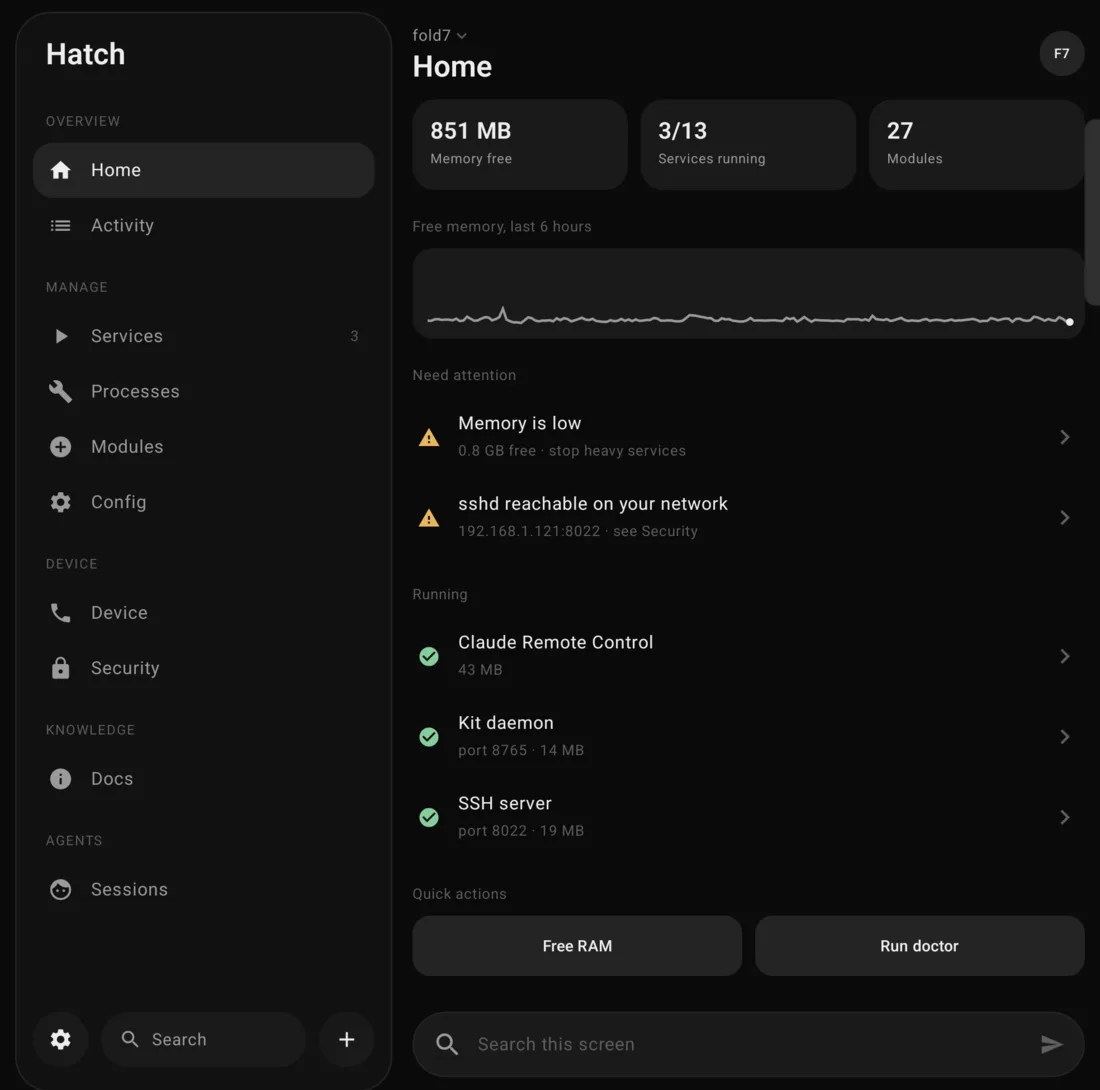
Hatch Home screen: free memory, services running, modules, a 6-hour memory chart, items that need attention and quick actions
Home

What needs you, first

Free memory, running services and installed modules at a glance, with a six-hour memory chart. Anything that needs attention sits on top: low memory, a heavy service, or a port reachable from your network.

  • Free RAM stops the heavy services in one tap
  • Run doctor checks every module's health
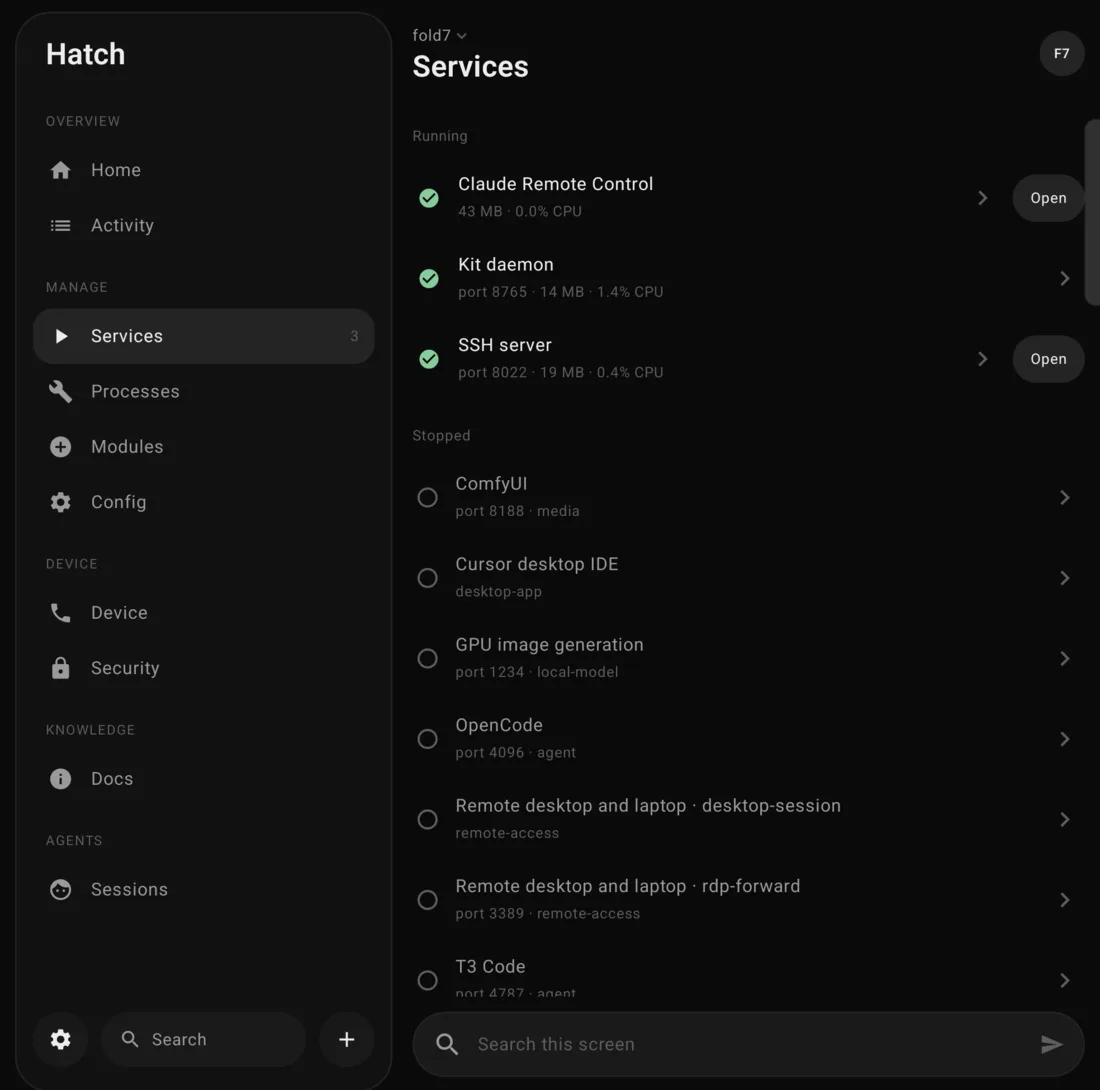
Services screen listing running and stopped services with Open buttons
Services

Everything that runs, with a way in

Remote Control, OpenCode, T3 Code, VS Code, ComfyUI, the GPU image server, remote desktop and more, grouped into running and stopped. Each row has an Open button for its app, web UI or terminal.

  • Start, stop and restart from the row's sheet
  • Memory and CPU per service
  • Apps and tools without a background service listed too
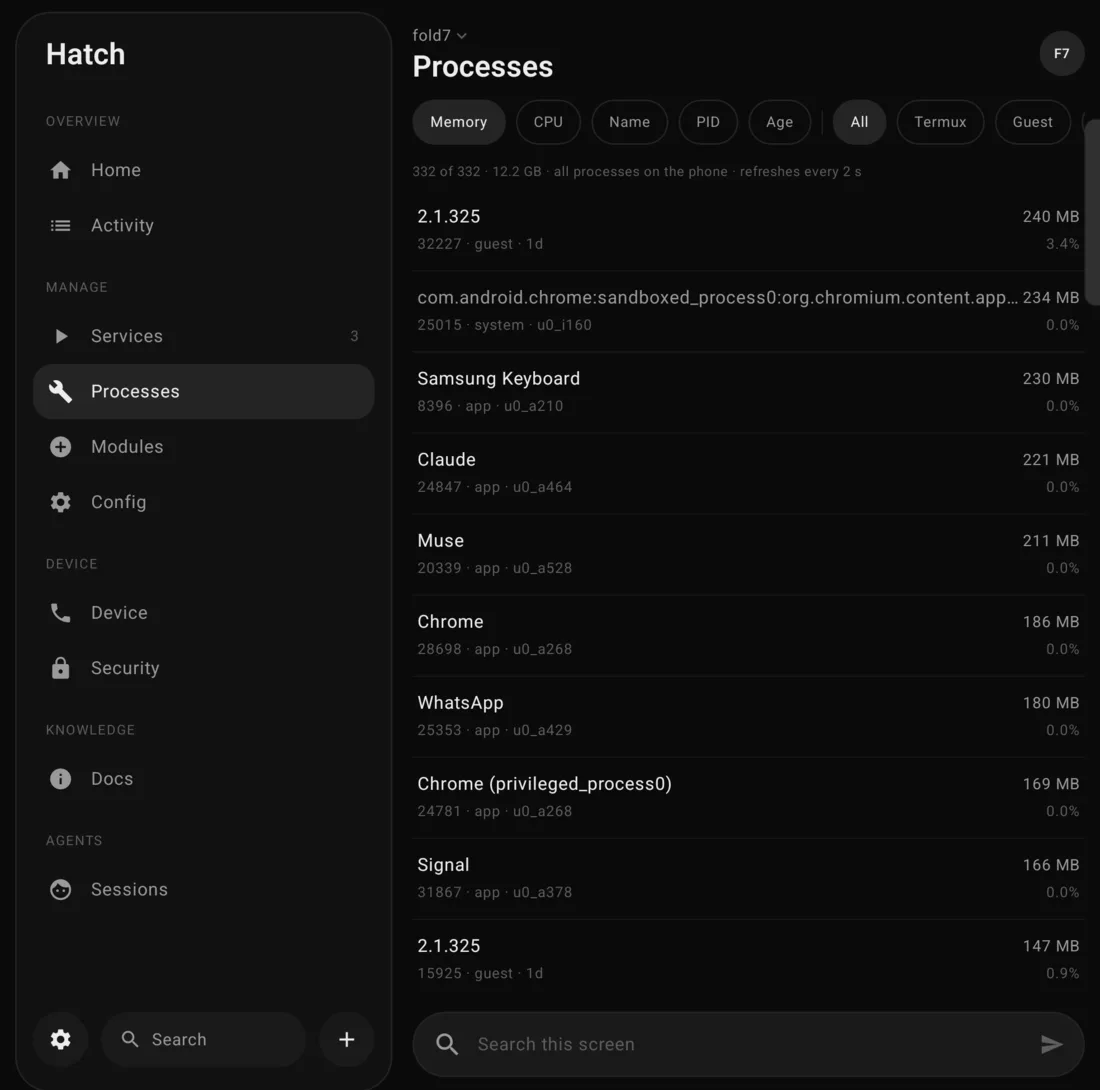
Processes screen listing every process on the phone with memory and CPU, sort and filter chips
Processes

Every process on the phone

Termux, the Ubuntu guest, other apps and the system, with real app names, memory and CPU. Sort, filter and search, then act on what you find.

  • Stop, stop with children or force kill Termux processes
  • Force stop or kill other apps; system processes stay read-only
  • Protected apps, like the system UI and Termux, can't be stopped by accident
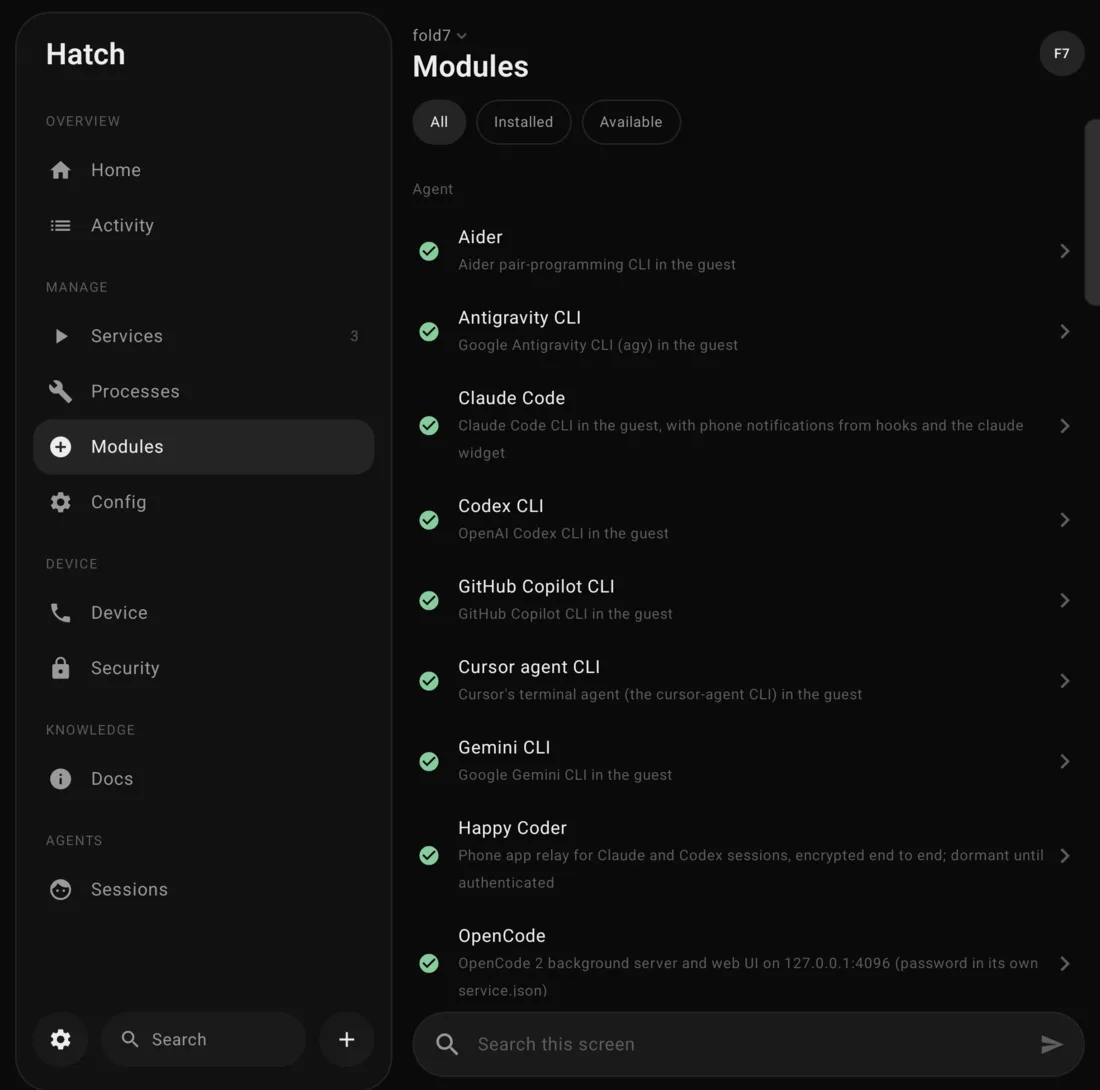
Modules screen grouped by category with installed status
Modules

Features as building blocks

Each feature is a module with a category, what it provides, what it works with and what it risks. Install, remove and health-check it, or open what it offers.

  • Blocked modules say exactly what is missing
  • Capabilities wire features together: ComfyUI finds the GPU server, T3 finds OpenCode
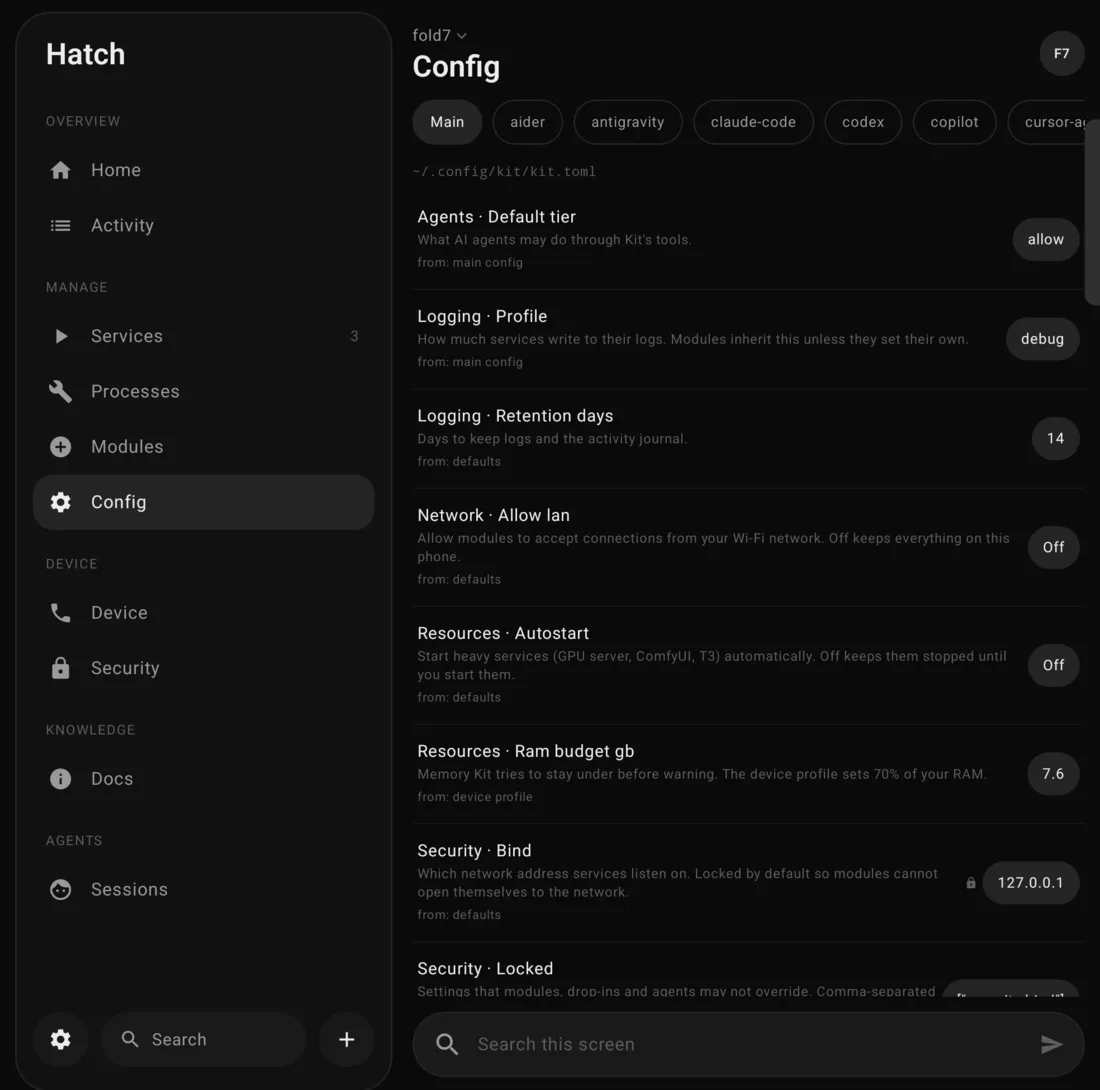
Config screen with settings, descriptions, source of each value and current values
Config

Settings that explain themselves

Main settings and per-feature settings, each with a plain description and where its value came from. Editing opens the right control: a list of choices, an on/off switch, or a number with its allowed range.

  • Features inherit main settings and can override them
  • Security settings can be locked against features and agents
  • The app edits the same files you can edit by hand, comments kept
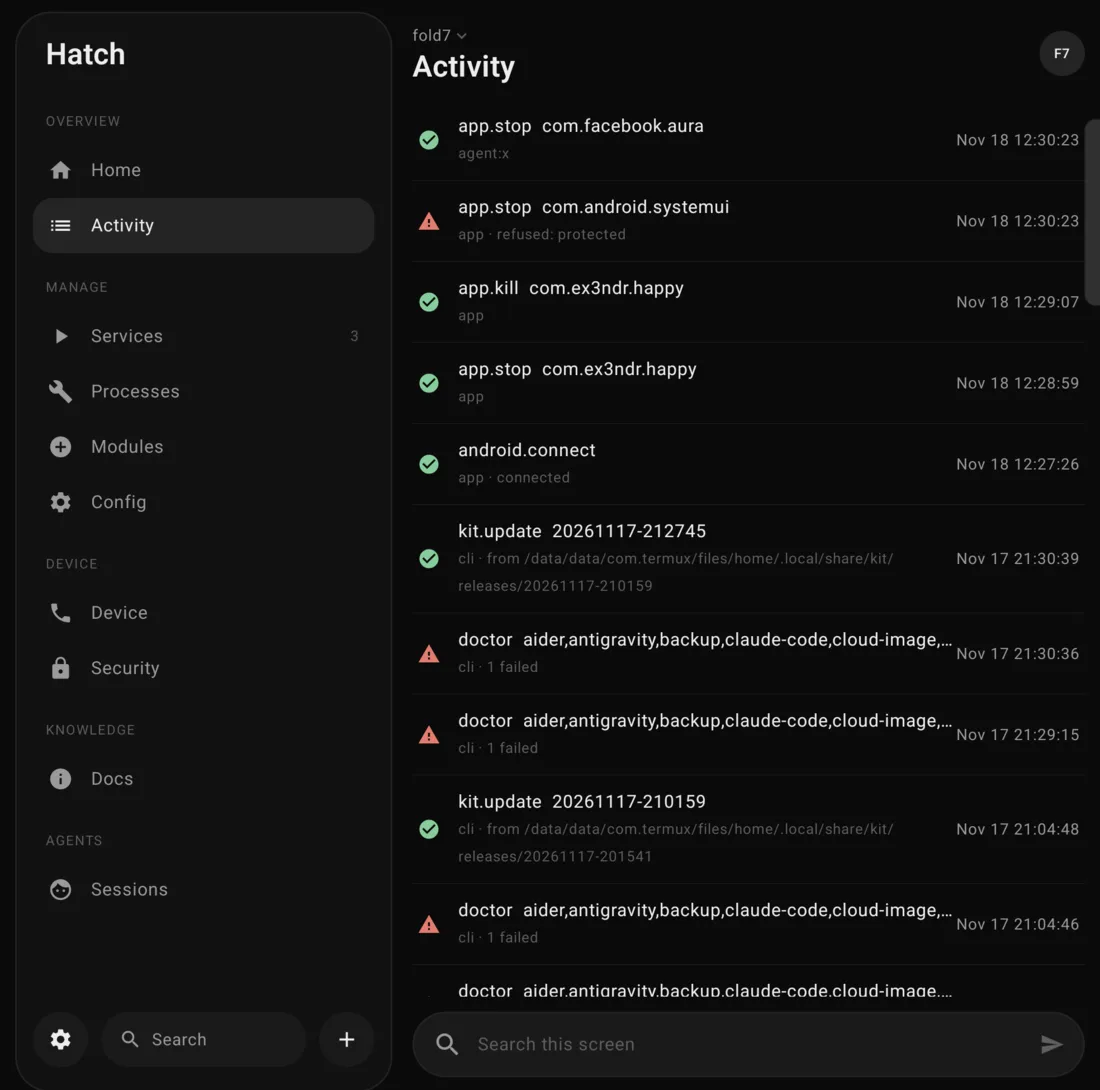
Activity journal listing actions with who did them, time and result
Activity

Who did what

Every start, stop, kill, install, setting change and refusal, with who did it (you in the app, the command line, or an agent) and whether it worked.

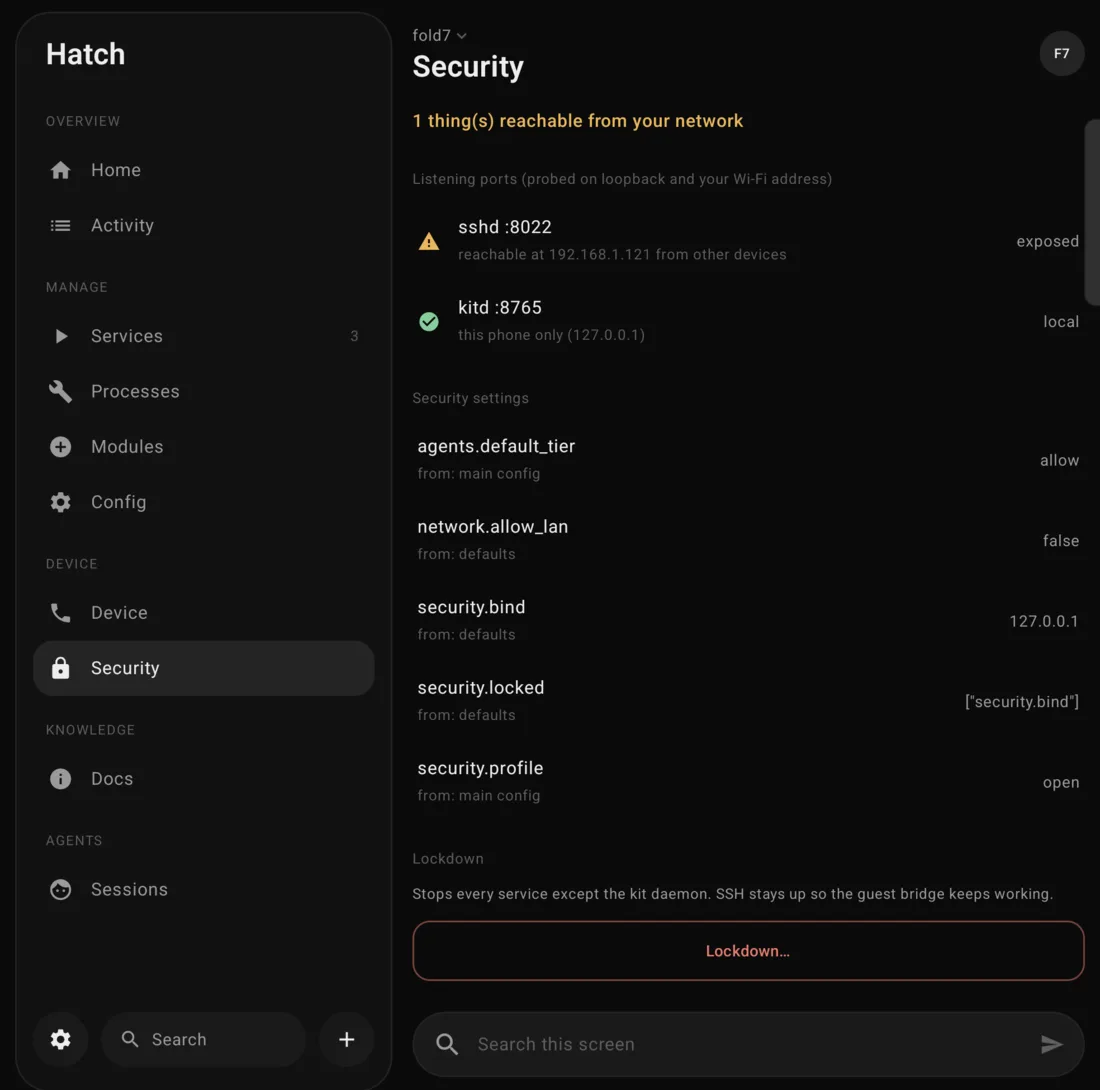
Security screen showing listening ports, security settings and a Lockdown button
Security

What can reach the phone

Checks every known port on the phone and on its Wi-Fi address and flags anything other devices could reach. Security settings sit beside it, and Lockdown stops every service except the daemon.

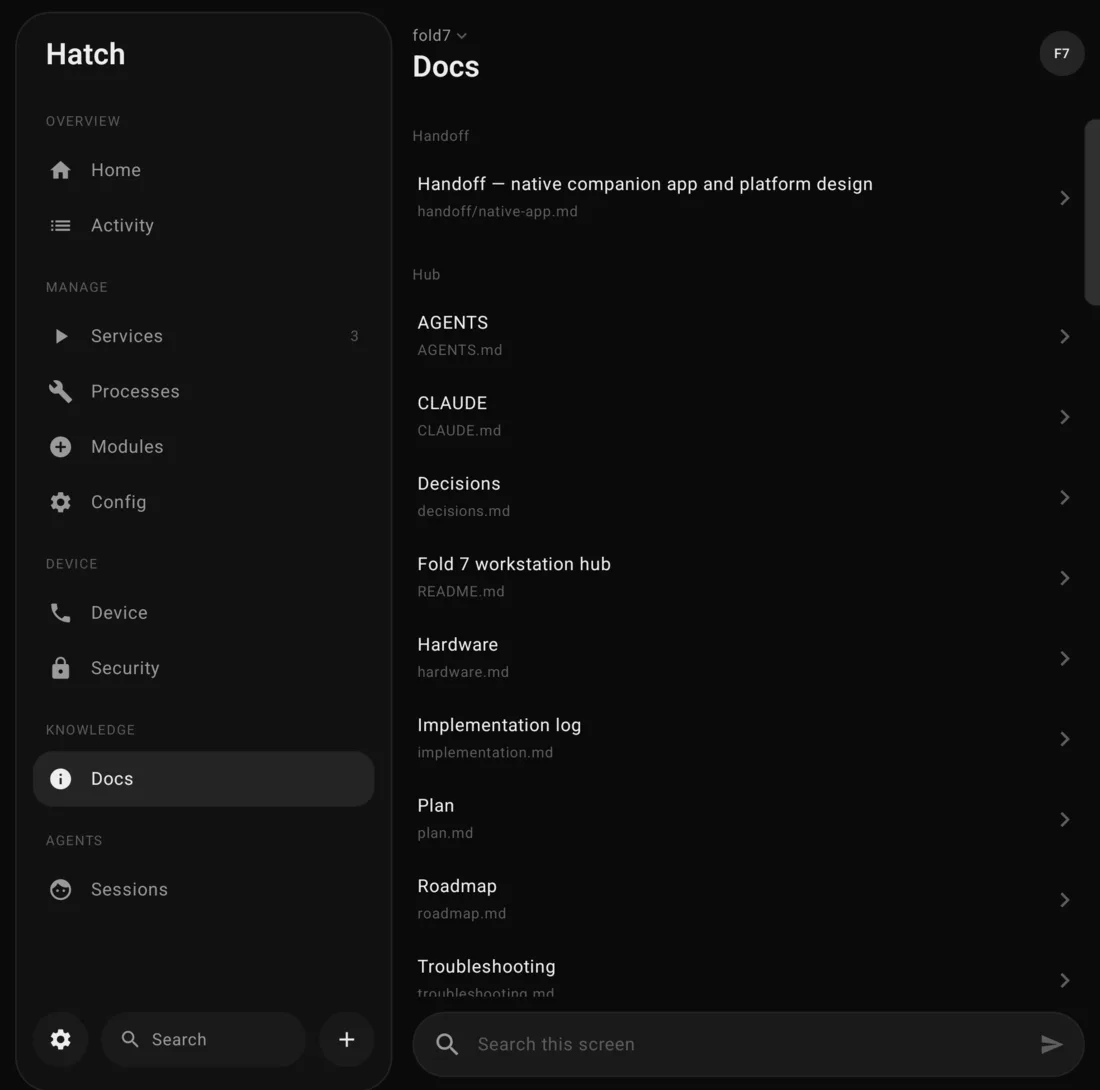
Docs screen listing the hub's documents
Docs

The setup's own manual, built in

Every runbook, plan and decision for this phone, rendered natively with tables and highlighted code. Links between pages open in the app, and search covers the full text.

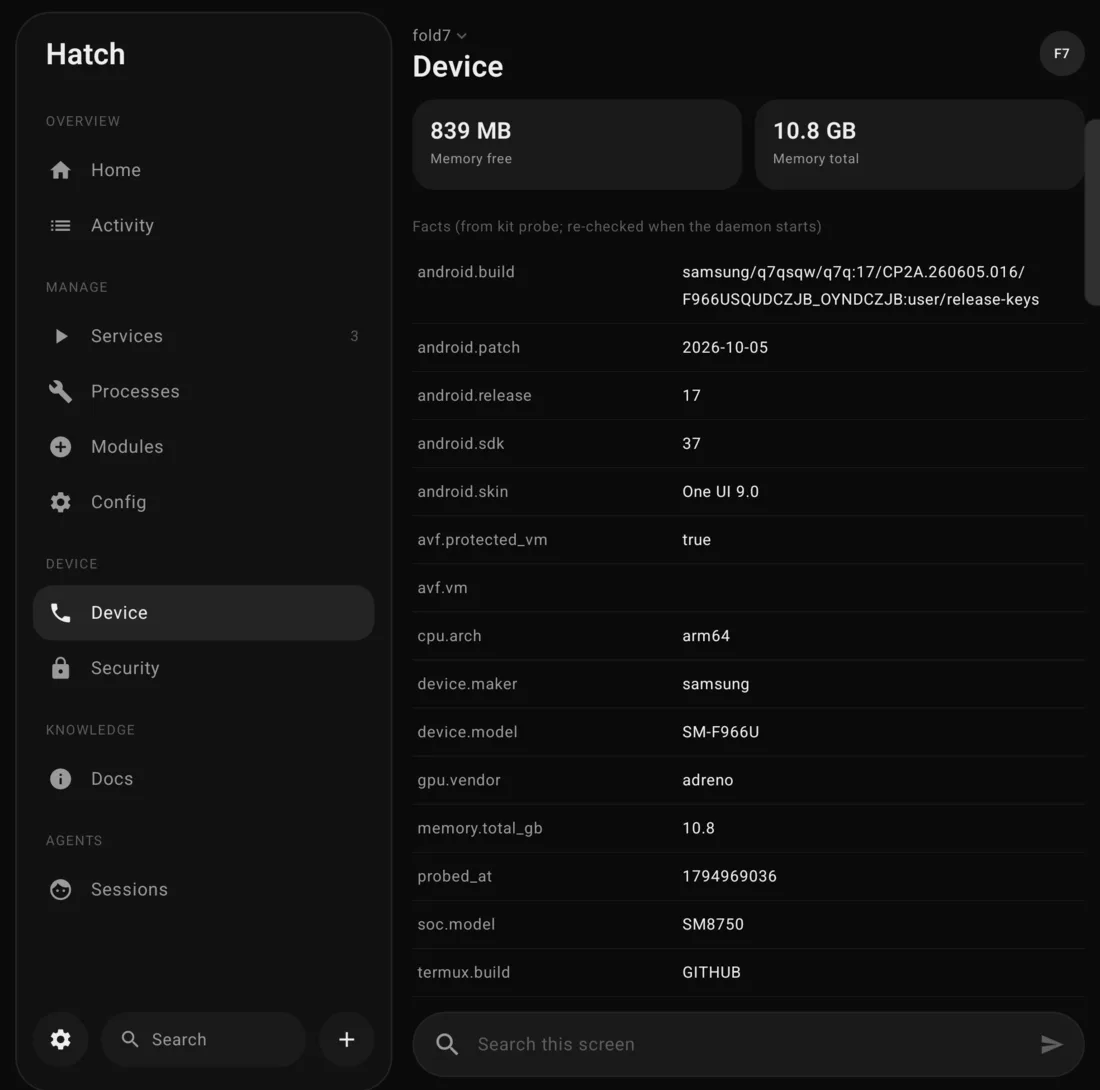
Device screen with phone facts: model, Android version, chipset, memory
Device

Knows the phone it's on

Model, Android and One UI version, chipset, GPU and memory, read from the phone. When the system updates, Hatch notices and re-checks every module.

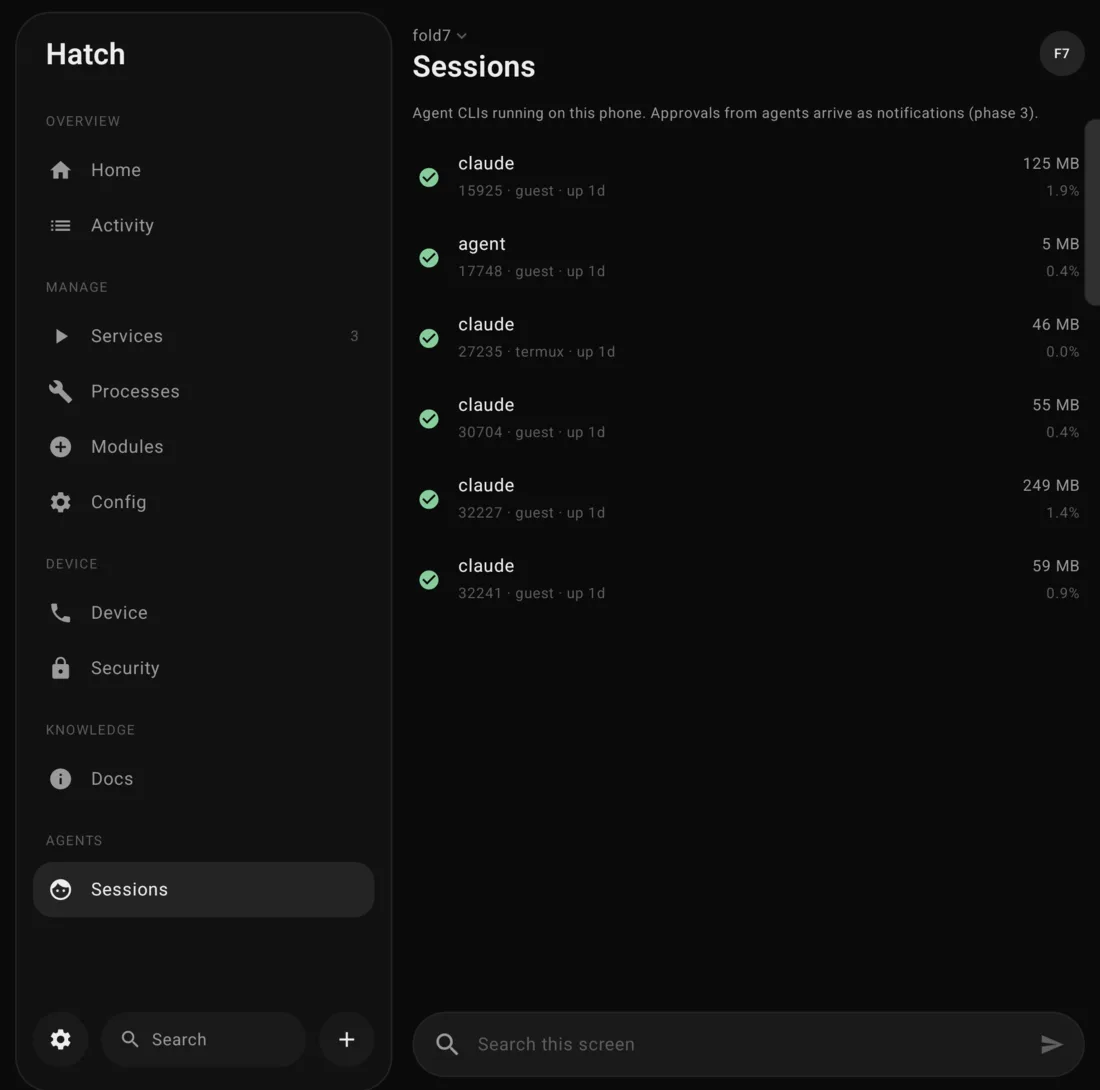
Sessions screen listing running agent command-line sessions
Sessions

Agents at work

The coding agents running on the phone right now, such as Claude Code, Cursor and OpenCode, with memory and CPU. Tap one to manage its process.

Modules

Everything Hatch manages

The 27 modules installed on this phone, grouped by category. Service means it runs in the background and Hatch can start, stop and restart it; Opens is how you get into it from the app.

AI agents 11

AiderTool

Aider pair-programming CLI in the guest

Opens Run aider in ~/code

Provides agent.aider

Antigravity CLITool

Google Antigravity CLI (agy) in the guest

Opens Run agy in ~/code

Provides agent.antigravity

Claude CodeTool

Claude Code CLI in the guest, with phone notifications from hooks and the claude widget

Opens New Claude session, Attach to tmux main

Provides agent.claude

Claude Remote ControlService

Claude Code session named fold7 that you drive from the Claude app; started at boot in tmux rc

Opens Open Claude app, Server console

Provides agent.remote-control

Codex CLITool

OpenAI Codex CLI in the guest

Opens Run codex in ~/code

Provides agent.codex

Cursor agent CLITool

Cursor's terminal agent (the cursor-agent CLI) in the guest

Opens Run agent in ~/code

Provides agent.cursor

Gemini CLITool

Google Gemini CLI in the guest

Opens Run gemini in ~/code

Provides agent.gemini

GitHub Copilot CLITool

GitHub Copilot CLI in the guest

Opens Run copilot in ~/code

Provides agent.copilot

Happy CoderTool

Phone app relay for Claude and Codex sessions, encrypted end to end; dormant until authenticated

Opens Open Happy app, Sign in (terminal), New Happy Claude session

Provides agent.relay

OpenCodeService

OpenCode 2 background server and web UI on 127.0.0.1:4096 (password in its own service.json)

Opens Open web UI (signs you in), Copy server password for T3 (hidden), OpenCode in a terminal, Server console

Provides agent.opencode, agent.opencode.server

T3 CodeService

Control plane for Claude, Codex, Cursor and OpenCode: threads, diffs, worktrees. Loopback 127.0.0.1:4787, on demand

Opens Connect the T3 app to this phone, Add my projects to T3, Open T3 app, Open web UI, Server console

Provides agent.control-plane

Editors 2

Developer toolsTool

Neovim with LazyVim, git, gh, node, python, go, rust, dotnet, java and the rest of the guest toolset

Opens Neovim in ~/code, Ubuntu shell

Provides editor.terminal, runtime.glibc

VS Code (code-server)Service

Offline VS Code in the browser on 127.0.0.1:8080, workspace ~/code

Opens Open VS Code

Provides editor.web

Remote access 2

Remote desktop and laptopService

Windows desktop RDP forwarded to localhost:3389 and SSH to laptop and desktop, all through Cloudflare Access; headless desktop session for agents

Opens Open Windows App (localhost:3389), Open Moonlight, SSH to laptop, SSH to desktop

Provides remote.rdp, remote.ssh

ttyd web terminalService

Browser view of tmux main. Listens on a private Unix socket for a Cloudflare tunnel; never on a TCP port by default

Opens Attach to tmux main

Provides terminal.web

Local models 2

GPU image generationService

Stable Diffusion on the Adreno GPU (stable-diffusion.cpp + Vulkan) with a web UI on :1234

Opens Open image UI

Provides image-gen.a1111

NPU image generationTool

SDXL-Lightning on the Hexagon V79 NPU through the SDXL-NPU app; needs its 2.4 GB model downloaded in-app once

Opens Open SDXL-NPU

Provides image-gen.npu

Media 2

ComfyUIService

Node-based image and video workflows (CPU), with GPU nodes that call the GPU server

Opens Open ComfyUI

Video toolsTool

ffmpeg 8 and the vid command: trim, join, captions, speed, GIFs

Opens —

Provides video.edit
Cloud models 1

Cloud image generationTool

Flux-schnell on Cloudflare Workers AI, credentials from the vault

Opens —

Provides image-gen.cloud

Desktop apps 1

Cursor desktop IDEService

Cursor's Linux arm64 IDE in the Ubuntu guest, shown through Termux:X11

Opens Open Termux:X11

Display 1

Termux:X11 displayService

X server on display :0 for Linux GUI apps (Cursor, XFCE)

Opens Open Termux:X11

Provides display.x11

Cloud 1

Encrypted backupTool

Full phone backup: Termux half, then age-encrypted upload to your R2 bucket

Opens Run a full backup (terminal)

Provides backup

Observability 2

Docs hubTool

The fold7 hub: plans, runbooks, research, state; mirrored to /sdcard/fold7 and served to the Kit app

Opens Open in Obsidian

Provides docs

Kit daemonService

The local kit API on 127.0.0.1:8765 that the app, CLI and agents use

Opens —

Provides kit.api

Runtime 1

SSH serverService

Termux sshd on port 8022; the guest's tx bridge depends on it

Opens Termux shell

Provides shell.ssh

Security 1

Secrets vaultTool

sops + age vault with an MCP broker; agents use secrets without seeing values

Opens —

Provides secrets.broker

Under the hood

How it holds together

A local daemon

A small service on the phone owns all state and every action. The app, the kit command line and AI agents all go through it, on this phone only, with a token.

Modules and capabilities

Each module declares what it needs, provides and risks. Swapping a provider, such as a cloud model for a local one, is a setting rather than new code.

Updates that can't strand you

An update is staged, checked against every installed module, backed up and smoke-tested before it switches, and rolls back on its own if the daemon doesn't come back.

Agents with limits

Agents get 17 tools through MCP. Read is always allowed; starting and stopping, installing and changing settings each need a permission level you set. Security settings never change through an agent.

Native and built on-device

Kotlin and Jetpack Compose, compiled on the phone itself in Termux. One column folded, two panes unfolded, and a persistent status notification.

Extensible

Add your own module with one command, or add a community registry pinned to a reviewed commit. Neither is touched by updates.

Modules on this phone
claude-coderemote-controlopencodet3-codehappycodexgeminicursor-agentcopilotaiderantigravitycode-serverdev-toolsgpu-imagenpu-imagecomfyuivideo-toolscloud-imagecursor-desktopdesktop-x11remote-accessttydsshdsecretsbackupdocs-hubkitd